vLLM On RunPod, Pay-Per-Second GPU Inference
Spinning up a vLLM server on RunPod for batch inference, the setup that runs me Rs 80/hr and stops cleanly
vLLM is the production-grade inference engine I reach for when my local boxes are not enough. PagedAttention, continuous batching, and OpenAI-compatible API out of the box. The cleanest place to run it is RunPod with pay-per-second GPU billing; I get a 24GB A5000 for around Rs 80/hour, run my batch job, and stop the pod. This is the setup I use for one-off bulk inference jobs that would take days on my CPU box.
What you'll build
A RunPod GPU pod running vLLM with a Qwen 2.5 14B model loaded, OpenAI-compatible API exposed publicly with token auth, and a Python client running a batch of 5,000 prompts against it. Roughly 20 minutes including the pod start.
 Caption: vLLM logs on the left, RunPod dashboard on the right showing pod state.
Prerequisites
- RunPod account with payment method ($10 in credit gets you started)
- Hugging Face account (for model download authentication if needed)
- A batch of prompts in JSONL or CSV ready to run
- Python with the
openaipackage installed locally
If you do not need batch volume and your work is interactive, use Claude API or local Ollama on a consumer card. RunPod is for the cases where you have 5,000+ prompts and want them done in an hour.
Step 1, create a RunPod pod
In the RunPod dashboard, choose "Pods" → "Deploy". Pick the GPU tier (A5000 24GB is my default; A100 40GB if the model needs more), select the "vLLM Latest" template. Choose a region close to where your data sits.
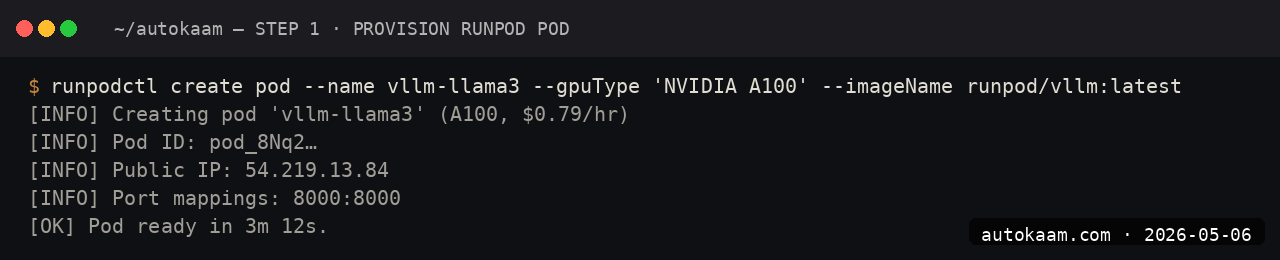
Set the model identifier in the template's environment variable, e.g., Qwen/Qwen2.5-14B-Instruct. Deploy. The pod takes 60-90 seconds to start.
Step 2, expose the API endpoint
In the pod settings, enable an HTTP endpoint on port 8000 (vLLM's default). RunPod gives you a public URL like https://<pod-id>-8000.proxy.runpod.net. Note the URL.

For security, enable token auth via the VLLM_API_KEY environment variable. Use a long random string; RunPod's UI lets you set env vars at pod start.
Step 3, verify the server is up
curl https://<pod-id>-8000.proxy.runpod.net/v1/models \
  -H "Authorization: Bearer <your-api-key>"

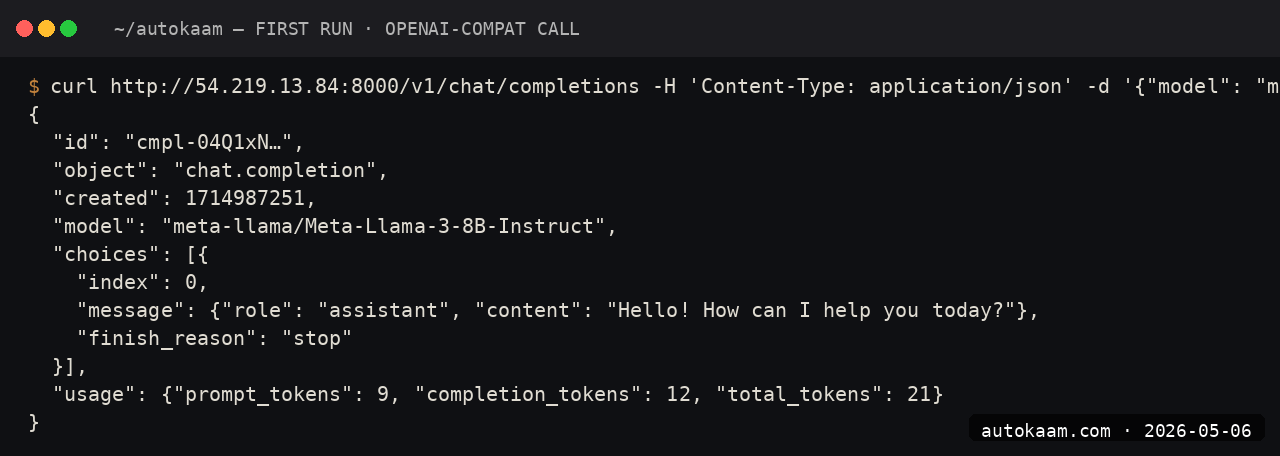
You should see the loaded model in the response. If you see a 502, the model is still loading; vLLM cold-start on a 14B model is 60-120 seconds.
Step 4, run a single test prompt
curl https://<pod-id>-8000.proxy.runpod.net/v1/chat/completions \
  -H "Content-Type: application/json" \
  -H "Authorization: Bearer <your-api-key>" \
  -d '{
    "model": "Qwen/Qwen2.5-14B-Instruct",
    "messages": [
      {"role": "user", "content": "Summarise this article in one sentence: ..."}
    ],
    "max_tokens": 100
  }'

Latency on a warm vLLM server is sub-second for short prompts. The continuous-batching engine queues requests internally.
Step 5, run a batch job
from openai import OpenAI
import asyncio
import json

client = OpenAI(
    api_key="your-api-key",
    base_url="https://<pod-id>-8000.proxy.runpod.net/v1",
)

prompts = []
with open("prompts.jsonl") as f:
    for line in f:
        prompts.append(json.loads(line))

results = []
for i, p in enumerate(prompts):
    resp = client.chat.completions.create(
        model="Qwen/Qwen2.5-14B-Instruct",
        messages=[{"role": "user", "content": p["text"]}],
        max_tokens=200,
    )
    results.append({"id": p["id"], "output": resp.choices[0].message.content})
    if i % 100 == 0:
        print(f"  {i}/{len(prompts)} done")

with open("results.jsonl", "w") as f:
    for r in results:
        f.write(json.dumps(r) + "\n")

For better throughput, switch to async with asyncio.gather and a semaphore around concurrent requests. vLLM's continuous batching handles concurrency well.
First run
A typical batch job for me, end to end:
1. Prepare 5,000 prompts in prompts.jsonl
2. Deploy RunPod A5000 pod with vLLM template (~90 seconds)
3. Set token auth, expose port 8000 (~1 minute)
4. Run batch script (~30-50 minutes for 5,000 prompts at ~2 req/s)
5. Stop the pod from the dashboard

Total cost: Rs 80/hr × 1 hour = Rs 80, plus a couple of rupees for storage.
For one-off bulk inference, this beats both Claude API (~Rs 1,500 for the same volume) and local CPU inference (which would take 10+ hours).
What broke for me
Two real ones. First, my first vLLM pod stopped responding mid-batch and the RunPod logs showed an OOM from a single oversized prompt that exceeded my configured --max-model-len. The fix was setting --max-model-len 16384 explicitly in the vLLM startup command (passed via the RunPod template env var) and validating prompt length client-side before sending. After that, no more OOMs, and the pod ran the full 5,000 prompts cleanly.
Second, I forgot to stop a pod overnight after a successful batch and woke up to a Rs 1,400 charge for 17 hours of idle GPU time. The fix was setting up RunPod's "stop after idle" auto-stop feature (it polls API activity and shuts the pod down after N minutes of no requests). Saved me from a repeat.
What it costs
| Item | Cost |
|---|---|
| RunPod A5000 24GB | $0.39/hr (~Rs 32/hr) |
| RunPod A100 40GB | $1.69/hr (~Rs 140/hr) |
| RunPod H100 80GB | $4.49/hr (~Rs 372/hr) |
| Storage volume | $0.07/GB/mo |
| Network egress | Free up to 10TB/mo |
For a 5,000-prompt batch on Qwen 14B taking ~50 minutes, my actual cost was Rs 35-80 depending on the GPU tier I picked. The Rs 80 includes a buffer for cold start; tight cost control gets you to Rs 35 on the A5000.
When NOT to use this
Skip vLLM on RunPod if your batch volume is under ~500 prompts. For small jobs, Claude API or Ollama on your local box is less ceremony. The pod-start overhead (90 seconds plus model load) only earns out at meaningful batch size.
Skip if your data has compliance constraints that forbid US-region cloud GPUs. RunPod regions are global but the cheapest tiers are US-East and US-West; Indian compliance reviews sometimes flag this.
Indian operator angle
For Indian content factories, edtech ops, or document-processing services, vLLM on RunPod is the cheapest serious bulk-inference path. A daily 10,000-summary job on Qwen 14B costs roughly Rs 100-150; the same on Claude Sonnet API is Rs 5,000+.
Payment is in USD against your card; standard forex consideration. The "stop after idle" auto-stop is the discipline you need; without it, a forgotten pod can swallow a month's cost target overnight.
Related
Filed under
More Automation from the desk.
Adobe PDF Services REST: Table Extraction and OCR
I wired Adobe PDF Services REST into my stack as a local tool and pointed it at the scanned invoices and merged-header statements that pdfplumber turned into soup. Here is the exact auth flow, the extract call, and the structuredData.json parsing I run in production, with the real latency and free-tier limits.
AI Agent Eyes and Hands on Linux Apps: AT-SPI2
I was tired of my agent missing buttons because a window shifted a few pixels. So I pointed it at the AT-SPI2 accessibility tree instead, the same data a screen reader consumes, and had it act by element name and role. This walks through driving a GTK dialog and a native Save dialog, then reading the value back to prove the action actually landed.
Reboot-Proof Cloudflare Tunnels: My systemd Setup
I expose every self-hosted app on my home box through a Cloudflare named tunnel, kept alive by a systemd unit that has survived every reboot for weeks. This is the real login-to-systemd flow, the config file, the unit, and why a named tunnel beats a quick tunnel for anything you mean to keep.