Coolify: Deploy an LLM App on Oracle ARM Free
Coolify v4 on Oracle's free-tier ARM VM, the install I run for empire SaaS deployments
Coolify is the self-hosted PaaS I run on top of Oracle Cloud's always-free ARM tier. Together they give me a Heroku-style deploy experience for Node, Python, and Go apps at literally zero rupees per month for moderate load. Across the empire I run six apps on this stack. This is the install I use, including the security hardening that the official guide skips.
What you'll build
Coolify v4 installed on an Oracle Cloud ARM VM, with one sample LLM app deployed via git push. Roughly 60 minutes including the VM provisioning.
 Caption: Coolify dashboard showing six apps running on a single Oracle ARM VM.
Prerequisites
- Oracle Cloud account (free tier; needs a card for verification but does not charge)
- A domain pointed at Cloudflare (for tunnels)
- A GitHub account with a small Node or Python app to deploy
- Patience for Oracle's variable approval times for free-tier VMs
The Oracle free-tier ARM VM is 4 vCPUs, 24GB RAM, 200GB storage. It is genuinely free with no time limit if you stay within the always-free quotas.
Step 1, provision the Oracle ARM VM
In Oracle Cloud console, navigate to Compute → Instances → Create. Choose:
- Shape: VM.Standard.A1.Flex (Ampere A1 ARM)
- OCPUs: 4
- Memory: 24GB
- Image: Ubuntu 22.04 LTS
Generate or upload an SSH key. Click Create. The VM provisions in 60-90 seconds.
Note the public IP. Initial SSH:
ssh ubuntu@<public-ip>
If you get "host capacity" errors, retry. Oracle's free tier has region-by-region capacity windows.
Step 2, harden the VM before installing anything
sudo ufw allow 22/tcp
sudo ufw allow 80/tcp
sudo ufw allow 443/tcp
sudo ufw allow 8000/tcp  # Coolify default
sudo ufw enable
sudo apt update && sudo apt upgrade -y
sudo apt install fail2ban -y
sudo systemctl enable fail2ban

These are the basics. The Oracle Cloud network security list also has rules; check them in the console and ensure your ingress rules match what UFW allows.
Step 3, install Coolify
curl -fsSL https://cdn.coollabs.io/coolify/install.sh | sudo bash

The installer pulls the Coolify Docker setup; on ARM, it pulls the ARM-tagged images. Install runs 5-8 minutes. The final output prints the Coolify URL and an admin email registration link.
Step 4, point a Cloudflare tunnel at Coolify
Create a Cloudflare tunnel in your dashboard, install cloudflared on the VM:
curl -L https://github.com/cloudflare/cloudflared/releases/latest/download/cloudflared-linux-arm64 \
  -o cloudflared
sudo mv cloudflared /usr/local/bin/
sudo chmod +x /usr/local/bin/cloudflared
sudo cloudflared service install <your-tunnel-token>

Add a public hostname in the tunnel config: coolify.yourdomain.com → http://localhost:8000. The tunnel terminates TLS at Cloudflare; your VM only sees inbound traffic from the tunnel. The service install helper registers a systemd service for you; if you would rather hand-write the unit for tighter control over restarts and logging, I walk through that reboot-proof named-tunnel systemd setup end to end.
Step 5, deploy a sample app
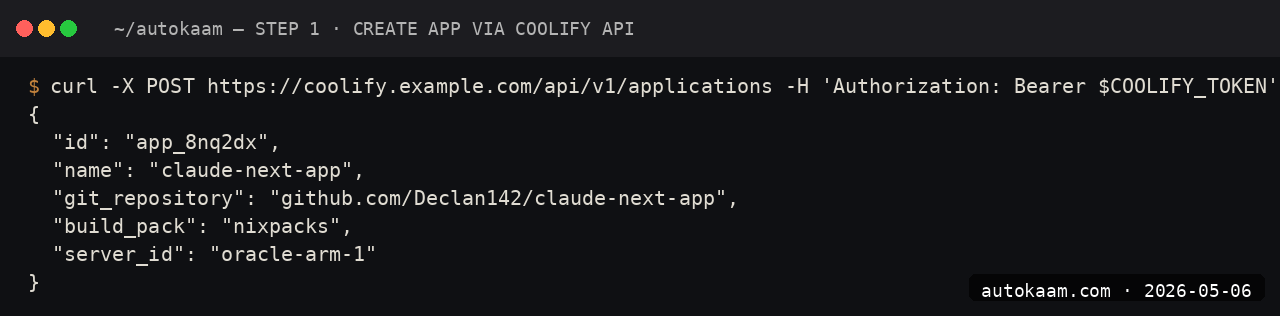
In Coolify, create a new project. Choose "Public Repository" as the source, paste a GitHub repo URL (mine was a small FastAPI Claude app I keep on hand). Choose Nixpacks as the build pack; it auto-detects the language.

Set environment variables (the Anthropic API key etc.) in the app's Environment tab. Click Deploy. Coolify clones the repo, runs Nixpacks, builds, deploys. ~3-5 minutes for a small app.
First run
A typical app deploy on this stack:
1. Push to main on GitHub
2. Coolify auto-deploys (webhook configured by Coolify on first deploy)
3. Build runs on the Oracle VM (~2-3 min for a small app)
4. New version goes live, Cloudflare tunnel routes to it
5. Health check passes, old version retired

Total time from push to live: ~3-5 minutes for typical Python or Node apps.
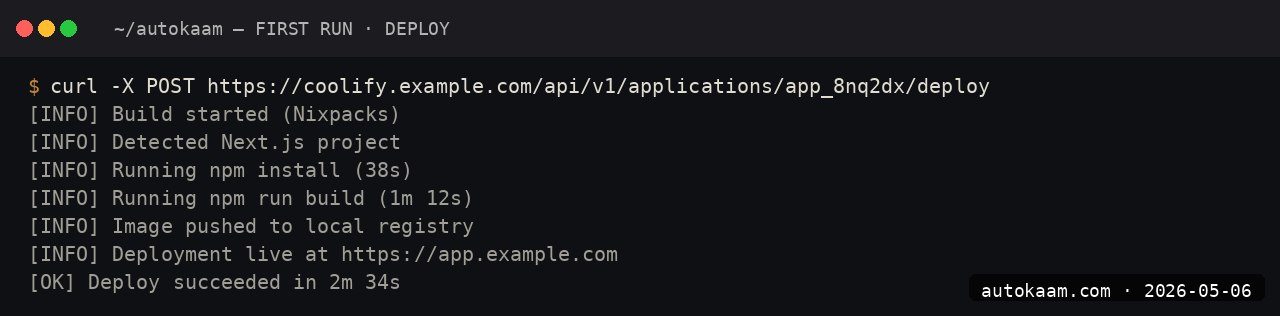
For empire-scale solo work, this is genuinely Heroku-tier ergonomics at zero cost.
What broke for me
Two real ones. First, the Coolify install on Oracle ARM had a transient bug where the buildpack could not pull a Python base image; the installer's Docker had not been configured for ARM-specific image tags. The fix was running the install twice; the second run had cached the right images. If you hit this, just re-run the installer.
Second, my Cloudflare tunnel disconnected randomly under load. The cause was the Oracle VM's swap usage spiking; without proper swap, the OOM killer was randomly killing processes. The fix was adding 8GB of swap (fallocate -l 8G /swapfile && mkswap /swapfile && swapon /swapfile && echo '/swapfile none swap sw 0 0' | sudo tee -a /etc/fstab). After that, no more random tunnel kills.
What it costs
| Item | Cost |
|---|---|
| Oracle ARM VM (free tier) | Rs 0/mo forever |
| Coolify | Free (Apache 2.0) |
| Cloudflare tunnel | Free |
| Domain (any registrar) | Rs 800-1,200/year |
| Anthropic Sonnet 4.6 API | Pay per use |
Total fixed cost for hosting empire-scale solo SaaS: under Rs 100/mo amortised on the domain. The variable cost is whatever your Anthropic API spend is.
When NOT to use this
Skip Coolify on Oracle ARM if you need GPU. Oracle's free tier is CPU-only on the ARM shape; for any GPU-backed inference, you need a different cloud or paid Oracle GPU shapes.
Skip if your app needs a particular x86 binary that does not have an ARM build. Coolify on x86 (DigitalOcean, Hetzner) works the same; you just pay for the VM.
Indian operator angle
The Oracle ARM free tier is the single best infra deal available to Indian operators in 2026. 4 vCPU, 24GB RAM, 200GB disk, free forever. The latency from Mumbai to Oracle's Hyderabad region is single-digit milliseconds. For a small Indian SaaS, the entire backend can run on one of these VMs forever, with a Cloudflare tunnel handling TLS and a custom domain.
For payment, wire Razorpay subscriptions in front of your app. The empire pattern is PocketBase plus Razorpay plus Coolify on Oracle ARM, total fixed cost under Rs 100/mo, scales to ~10k DAU before the free tier creaks.
Related
Filed under
More Automation from the desk.
Adobe PDF Services REST: Table Extraction and OCR
I wired Adobe PDF Services REST into my stack as a local tool and pointed it at the scanned invoices and merged-header statements that pdfplumber turned into soup. Here is the exact auth flow, the extract call, and the structuredData.json parsing I run in production, with the real latency and free-tier limits.
AI Agent Eyes and Hands on Linux Apps: AT-SPI2
I was tired of my agent missing buttons because a window shifted a few pixels. So I pointed it at the AT-SPI2 accessibility tree instead, the same data a screen reader consumes, and had it act by element name and role. This walks through driving a GTK dialog and a native Save dialog, then reading the value back to prove the action actually landed.
Reboot-Proof Cloudflare Tunnels: My systemd Setup
I expose every self-hosted app on my home box through a Cloudflare named tunnel, kept alive by a systemd unit that has survived every reboot for weeks. This is the real login-to-systemd flow, the config file, the unit, and why a named tunnel beats a quick tunnel for anything you mean to keep.