Ollama Gemma 4 on Linux: Install to First Token
Google's open-source Gemma 4 9B running locally on my ThinkCentre, the install that landed for me
Gemma 4 is the open-source Google model that put solid 9B-class quality within reach of a stock laptop. I run Gemma 4 9B on the ThinkCentre with 32GB RAM, no GPU, and it serves my routine summarisation, content-rewrite, and bulk classification work without an API call. This is the install that worked, including the Ollama config tweak that fixed my context-window issue.
What you'll build
Ollama installed on Linux, Gemma 4 9B pulled and running, with a Python OpenAI-compatible client to call it from your scripts. Roughly 25 minutes including the model pull on a 50Mbps line.
 Caption: Ollama serving Gemma 4 9B via the local API.
Prerequisites
- Linux x86_64 (Ubuntu 22.04+ or any modern distro)
- 16GB RAM minimum for the 9B model, 8GB if you stick with Gemma 4 2B
- 6GB free disk for the 9B at default quantization
- A Python venv if you plan to call the API from Python
If you have an Nvidia GPU, Ollama will use it automatically. CPU-only works fine on a modern processor; expect ~30 tok/sec on the 9B. On an Nvidia desktop, if the rest of the machine micro-stutters while a model loads, that is usually GPU clock thrash, not the compositor, and it has a one-line fix.
Step 1, install Ollama
curl -fsSL https://ollama.com/install.sh | sh
ollama --version
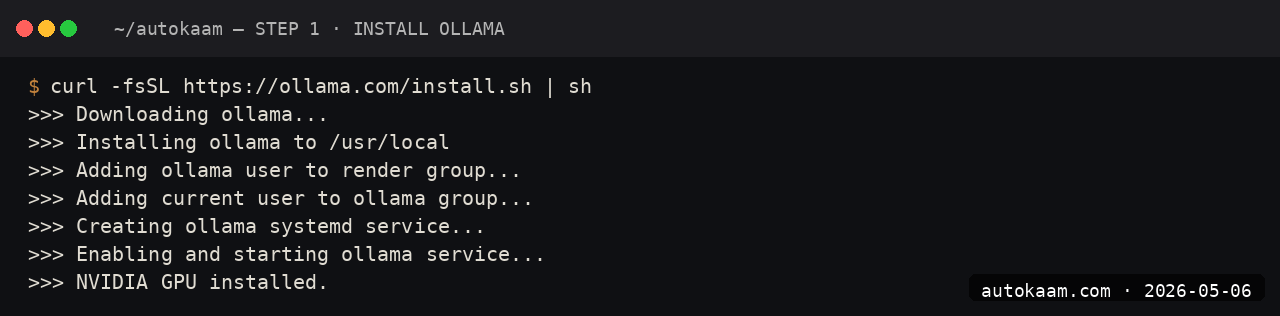
The script writes to /usr/local/bin/ollama, sets up a systemd unit, and binds the API to localhost:11434. Verify with systemctl status ollama.
Step 2, pull Gemma 4
ollama pull gemma4:9b
ollama list
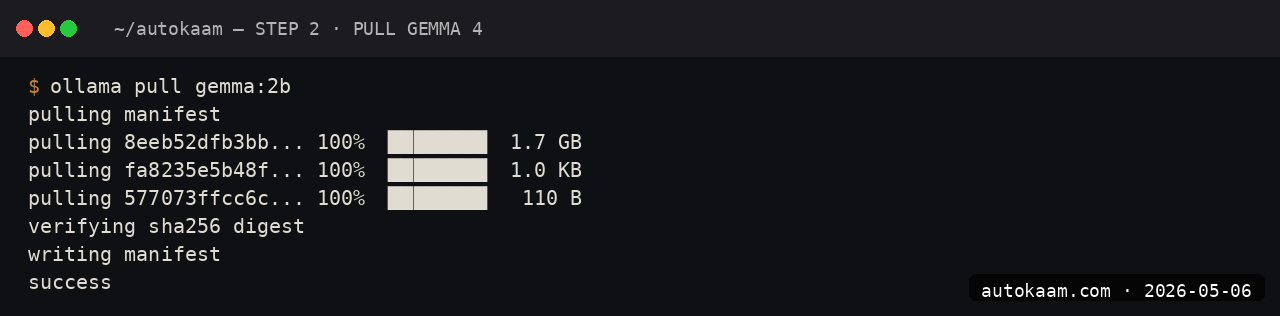
The 9B at default quantization is ~5.5GB. On my Jio fibre at 50Mbps, the pull takes ~16 minutes. The Ollama registry is geo-routed; if you see slow speeds, your route is hitting the wrong CDN edge. Cloudflare WARP (free) often fixes this.
For comparison:
gemma4:2bis 2GB, runs on 8GB RAMgemma4:9bis 5.5GB, needs 16GB RAMgemma4:9b-q4is 4.4GB, lower quality but easier on RAM
Step 3, run a basic prompt
ollama run gemma4:9b
> Summarise the difference between Gemma 4 and Llama 3.3 in two sentences.

The first prompt has a ~10-second cold-start while the model loads into RAM. Subsequent prompts in the same session are sub-second to first token.
Step 4, fix the context window default
The Ollama default context window is 2048 tokens, which is comically small for any real work. To set a larger context for Gemma 4:
ollama run gemma4:9b
> /set parameter num_ctx 8192
> /save gemma4-8k

You now have a gemma4-8k model with the larger context. For one-off use, you can also pass --num-ctx 8192 on the command line. The official docs mention this in passing; the default trips up most people.
Step 5, call from Python
Ollama exposes an OpenAI-compatible API. Install the OpenAI SDK and point it at localhost:
pip install openai
On a fresh Ubuntu 24.04 box that pip install may fail with externally-managed-environment. The Python environment traps on Ubuntu 24.04 cover the PEP 668 fix and a stdlib name collision that breaks imports in project directories.
from openai import OpenAI

client = OpenAI(
    api_key="ollama",  # dummy, ignored
    base_url="http://localhost:11434/v1",
)

response = client.chat.completions.create(
    model="gemma4:9b",
    messages=[
        {"role": "user", "content": "Write a one-line summary of microservices."},
    ],
)
print(response.choices[0].message.content)

Existing OpenAI SDK code can swap to local Gemma with a base_url change. The migration friction is genuinely zero for non-streaming workloads.
First run
A typical day-of-use session for me:
$ ollama run gemma4-8k
> classify these 50 product reviews as positive, negative, or mixed:

[paste 50 reviews]

[Gemma processes, returns categorised list]

> rewrite the negative ones as polite customer-feedback summaries

[Gemma rewrites all]

For bulk text work, local Gemma is the right tool. Cloud APIs would charge for every token; local is free past the electricity.
What broke for me
Two issues. First, Ollama would silently OOM on long prompts when the context filled up, with no error in the foreground; the model would just go quiet. The fix was watching journalctl -u ollama -f while running a long prompt; the OOM kill showed up clearly there. I added swap (sudo fallocate -l 8G /swapfile etc.) which gave me headroom for occasional spikes without buying more RAM.
Second, on Ubuntu 24.04 with the systemd-managed Ollama, the model cache lived under /usr/share/ollama/.ollama/models/ rather than ~/.ollama/models/ as the docs sometimes imply. When I tried to symlink models from another machine, the systemd service ran as a separate user and could not see the symlinks. The fix was running Ollama as my own user (systemctl stop ollama, then OLLAMA_HOST=127.0.0.1:11434 ollama serve) for the migration session.
What it costs
| Item | Cost |
|---|---|
| Ollama | Free (MIT) |
| Gemma 4 9B | Free (custom Google licence) |
| Disk (5.5GB) | Negligible |
| Electricity (heavy use) | ~Rs 200/mo |
| Network (initial pull) | One-time 5.5GB |
For Indian operators running bulk text work, the math against API pricing is decisive. 100,000 summaries on Sonnet 4.6 would be Rs 4,000+ in API spend; locally on Gemma 4 9B it is electricity money.
When NOT to use this
Skip Gemma 4 9B locally if your work needs frontier reasoning quality. Gemma 4 9B is solid but not Claude Sonnet; for novel architecture work, code review of complex business logic, or anything where one wrong inference is expensive, the cloud frontier still wins.
Skip if you have less than 16GB RAM and no swap. The 2B variant works in 8GB but the quality drop versus 9B is noticeable for any real task.
Indian operator angle
Local Gemma is the only zero-marginal-cost LLM workflow I have found that holds up for production-volume work. For a content factory, bulk product description generation, or classification at scale, a Tier-2 city studio with one good machine can run more inference per day than a Mumbai consultancy paying API bills.
For Indian-language work, Gemma 4 handles Hindi reasonably; Krutrim, Sarvam-1, or Bhashini-tuned Gemma variants are better for native fluency. Pull krutrim:7b or sarvam-1:7b from Ollama for India-trained baselines.
Related
Filed under
More Automation from the desk.
Adobe PDF Services REST: Table Extraction and OCR
I wired Adobe PDF Services REST into my stack as a local tool and pointed it at the scanned invoices and merged-header statements that pdfplumber turned into soup. Here is the exact auth flow, the extract call, and the structuredData.json parsing I run in production, with the real latency and free-tier limits.
AI Agent Eyes and Hands on Linux Apps: AT-SPI2
I was tired of my agent missing buttons because a window shifted a few pixels. So I pointed it at the AT-SPI2 accessibility tree instead, the same data a screen reader consumes, and had it act by element name and role. This walks through driving a GTK dialog and a native Save dialog, then reading the value back to prove the action actually landed.
Reboot-Proof Cloudflare Tunnels: My systemd Setup
I expose every self-hosted app on my home box through a Cloudflare named tunnel, kept alive by a systemd unit that has survived every reboot for weeks. This is the real login-to-systemd flow, the config file, the unit, and why a named tunnel beats a quick tunnel for anything you mean to keep.