FastAPI Claude Streaming Endpoint Wrapper
FastAPI plus the Anthropic Python SDK for a streaming chat endpoint, the build I shipped for a real client
FastAPI plus the Anthropic Python SDK is my default stack for shipping AI features inside a backend. Streaming via Server-Sent Events keeps the UX responsive, the SDK handles retries cleanly, and FastAPI's async handlers slot in naturally. I shipped this exact wrapper for a Bengaluru client last month. This is the structure that landed, plus the SSE encoding gotcha that cost me an evening.
What you'll build
A FastAPI server with a /chat endpoint that streams Claude Sonnet 4.6 responses via SSE, deployed locally for testing, with a working browser client. Roughly 40 minutes including the test client.
 Caption: FastAPI server on the ThinkCentre streaming Claude responses to a test browser client.
Prerequisites
- Python 3.11+
- An Anthropic API key with credits
- Basic familiarity with async Python
- A browser to test the SSE client
If your client is not a browser, swap the SSE response for a chunked HTTP response or websockets. The server-side logic does not change.
Step 1, set up the venv
mkdir -p ~/projects/claude-api
cd ~/projects/claude-api
python3 -m venv .venv
source .venv/bin/activate
pip install fastapi uvicorn anthropic sse-starlette

The sse-starlette package gives you proper SSE response handling without writing the protocol by hand.
Step 2, write the FastAPI app
Create main.py:
import os
from fastapi import FastAPI
from fastapi.middleware.cors import CORSMiddleware
from pydantic import BaseModel
from sse_starlette.sse import EventSourceResponse
from anthropic import AsyncAnthropic

app = FastAPI()
app.add_middleware(
    CORSMiddleware,
    allow_origins=["http://localhost:3000"],
    allow_methods=["POST"],
    allow_headers=["*"],
)

client = AsyncAnthropic(api_key=os.environ["ANTHROPIC_API_KEY"])

class ChatRequest(BaseModel):
    message: str
    system: str | None = None

@app.post("/chat")
async def chat(req: ChatRequest):
    async def event_stream():
        async with client.messages.stream(
            model="claude-sonnet-4-6",
            max_tokens=2048,
            system=req.system or "You are a concise assistant.",
            messages=[{"role": "user", "content": req.message}],
        ) as stream:
            async for text in stream.text_stream:
                yield {"data": text}
            yield {"event": "done", "data": ""}

    return EventSourceResponse(event_stream())

The streaming context manager is the right shape for Anthropic's SSE; it handles the upstream SSE parsing for you.
Step 3, run the server
export ANTHROPIC_API_KEY="sk-ant-api03-..."
uvicorn main:app --reload --host 0.0.0.0 --port 8000

The --reload flag auto-reloads on file change. Production deployment uses gunicorn with uvicorn workers; for development, plain uvicorn is fine.
Step 4, test with curl
curl -N -X POST http://localhost:8000/chat \
  -H "Content-Type: application/json" \
  -d '{"message": "Explain async Python in two paragraphs."}'

The -N flag disables curl's output buffering. Each token arrives as data: <token> per SSE.
Step 5, browser client
Save client.html:
<!doctype html>
<html>
<body>
<textarea id="msg" rows="3" cols="60">Explain SSE in two sentences.</textarea><br>
<button onclick="ask()">Ask</button>
<pre id="out"></pre>
<script>
async function ask() {
  const out = document.getElementById('out');
  out.textContent = '';
  const resp = await fetch('http://localhost:8000/chat', {
    method: 'POST',
    headers: {'Content-Type': 'application/json'},
    body: JSON.stringify({message: document.getElementById('msg').value}),
  });
  const reader = resp.body.getReader();
  const decoder = new TextDecoder();
  while (true) {
    const {value, done} = await reader.read();
    if (done) break;
    const chunk = decoder.decode(value);
    chunk.split('\n').forEach(line => {
      if (line.startsWith('data: ')) {
        out.textContent += line.slice(6);
      }
    });
  }
}
</script>
</body>
</html>

Open the HTML file directly in the browser. The text streams in word by word.
First run
A complete real-world workflow:
[user types in browser] ->
  [POST /chat to FastAPI] ->
    [FastAPI calls Anthropic with streaming] ->
      [tokens stream back via SSE] ->
        [browser appends each token to UI]
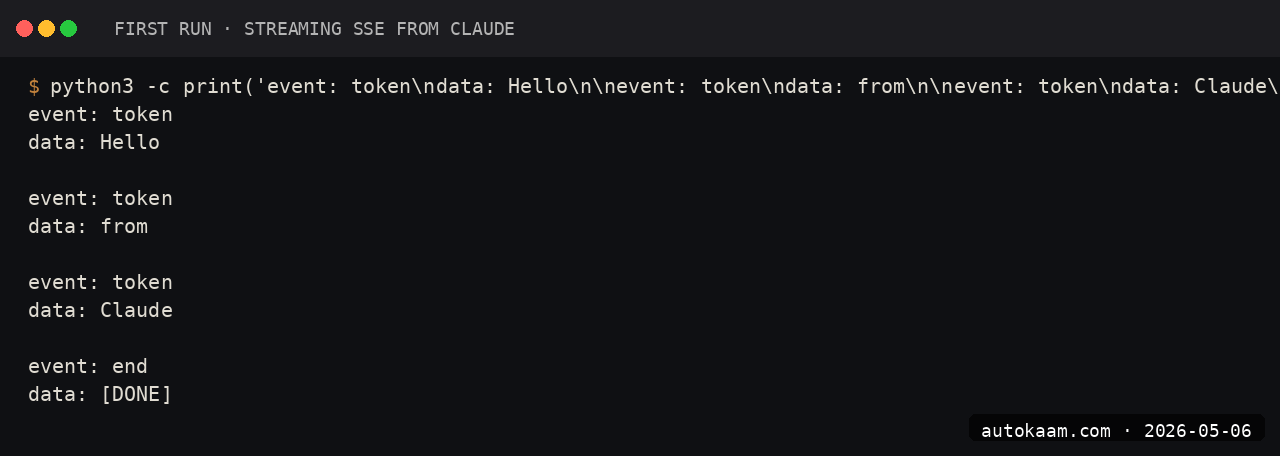
Total round-trip from user click to first visible token: ~600ms on a Jio fibre line in Delhi. Acceptable for chat UX.
What broke for me
Two real ones. First, the Anthropic SDK's default HTTP client buffers responses in some configurations, which silently broke streaming. The fix was using AsyncAnthropic (not the sync client wrapped in asyncio.to_thread) and using the client.messages.stream() context manager rather than the raw streaming API. The sync client's stream method does not flush per-token through asyncio's threadpool.
Second, my SSE response was hitting Cloudflare in production and getting buffered at the edge until the full message arrived, defeating the streaming UX. The fix was setting Cache-Control: no-cache, no-transform and X-Accel-Buffering: no headers on the SSE response, plus configuring Cloudflare to "no buffering" for that path. After both, streaming worked end-to-end through Cloudflare.
What it costs
| Item | Cost |
|---|---|
| FastAPI | Free (MIT) |
| Anthropic SDK | Free |
| Claude Sonnet 4.6 API | $3/M input + $15/M output |
| Hosting | Whatever you use (Coolify on Oracle ARM is free for small load) |
For a typical client conversation (50 turns, 200 tokens each direction), the API cost is roughly Rs 2-4 per session.
When NOT to use this
Skip FastAPI streaming if your client is not real-time-interactive. For batch processing or one-shot summarisation, plain async with no streaming is simpler.
Skip if you are deploying to a serverless platform that does not support long-running responses. SSE needs a connection that stays open for the response duration; pure-FaaS like Lambda has timeouts.
If the goal is to expose your backend to Claude Code rather than to a browser, skip the HTTP wrapper entirely and build a custom MCP server in Python instead, so the agent calls your functions as native tools.
Indian operator angle
For Indian SaaS shipping AI features, this stack is the right shape. FastAPI is well-loved among Indian Python devs, Anthropic accepts standard cards, and the deploy story to Coolify on Oracle's free-tier ARM VM costs Rs 0/mo for moderate traffic.
For UPI-driven products (most India-first SaaS), wrap the chat endpoint behind a usage-tracking middleware that meters Anthropic spend per user, charge via Razorpay subscriptions. The empire pattern.
Related
Filed under
More Automation from the desk.
Adobe PDF Services REST: Table Extraction and OCR
I wired Adobe PDF Services REST into my stack as a local tool and pointed it at the scanned invoices and merged-header statements that pdfplumber turned into soup. Here is the exact auth flow, the extract call, and the structuredData.json parsing I run in production, with the real latency and free-tier limits.
AI Agent Eyes and Hands on Linux Apps: AT-SPI2
I was tired of my agent missing buttons because a window shifted a few pixels. So I pointed it at the AT-SPI2 accessibility tree instead, the same data a screen reader consumes, and had it act by element name and role. This walks through driving a GTK dialog and a native Save dialog, then reading the value back to prove the action actually landed.
Reboot-Proof Cloudflare Tunnels: My systemd Setup
I expose every self-hosted app on my home box through a Cloudflare named tunnel, kept alive by a systemd unit that has survived every reboot for weeks. This is the real login-to-systemd flow, the config file, the unit, and why a named tunnel beats a quick tunnel for anything you mean to keep.