PocketBase As SaaS Backend, Wired To Claude
PocketBase v0.23 plus Claude Sonnet for AI features, the stack I run for my own SaaS empire
PocketBase is the single-binary Go backend that I run across my entire SaaS empire as the standard data layer. Auth, SQLite database, file storage, realtime subscriptions, an admin UI, all in one binary, all on disk. Wired to Claude Sonnet 4.6 via a small custom hook, you get a backend with built-in AI features in 50 lines of Go. This is the stack I keep returning to.
What you'll build
PocketBase v0.23 running as a systemd service on a Linux VM, with a sample collection, an HTTP route that proxies to Claude, and a working frontend test. Roughly 35 minutes.
 Caption: PocketBase admin UI with custom Claude route visible in the routes section.
Prerequisites
- A Linux VM (mine is the Oracle ARM free tier; an x86 VPS works too)
- Go 1.22+ if you want to build a custom binary (recommended for the Claude hook)
- An Anthropic API key with credits
- Basic Go familiarity for the hook (one file, ~80 lines)
If you do not want to write Go, you can call PocketBase's stock build from a separate FastAPI or Express service. The custom binary is cleaner.
Step 1, set up the Go project
mkdir pb-claude-app
cd pb-claude-app
go mod init github.com/Declan142/pb-claude-app
go get github.com/pocketbase/pocketbase
go get github.com/anthropics/anthropic-sdk-go

The Go module pulls PocketBase as a library and the official Anthropic Go SDK. Both are stable; pin the major version.
Step 2, write main.go
package main

import (
    "context"
    "log"
    "net/http"
    "os"

    "github.com/anthropics/anthropic-sdk-go"
    "github.com/anthropics/anthropic-sdk-go/option"
    "github.com/pocketbase/pocketbase"
    "github.com/pocketbase/pocketbase/apis"
    "github.com/pocketbase/pocketbase/core"
)

func main() {
    app := pocketbase.New()
    claude := anthropic.NewClient(option.WithAPIKey(os.Getenv("ANTHROPIC_API_KEY")))

    app.OnServe().BindFunc(func(se *core.ServeEvent) error {
        se.Router.POST("/api/chat", func(re *core.RequestEvent) error {
            data := struct {
                Message string `json:"message"`
            }{}
            if err := re.BindBody(&data); err != nil {
                return apis.NewBadRequestError("invalid body", err)
            }
            resp, err := claude.Messages.New(context.Background(), anthropic.MessageNewParams{
                Model:     anthropic.F(anthropic.ModelClaudeSonnet4_6),
                MaxTokens: anthropic.F(int64(512)),
                Messages: anthropic.F([]anthropic.MessageParam{{
                    Role:    anthropic.F(anthropic.MessageParamRoleUser),
                    Content: anthropic.F([]anthropic.ContentBlockParamUnion{anthropic.NewTextBlock(data.Message)}),
                }}),
            })
            if err != nil {
                return apis.NewApiError(http.StatusBadGateway, "claude error", err)
            }
            return re.JSON(http.StatusOK, map[string]string{"reply": resp.Content[0].Text})
        }).Bind(apis.RequireAuth())
        return se.Next()
    })

    if err := app.Start(); err != nil {
        log.Fatal(err)
    }
}

The RequireAuth() middleware enforces that only authenticated PocketBase users can call this route. Drop it if you want the route public.
Step 3, build and run
export ANTHROPIC_API_KEY="sk-ant-api03-..."
go build -o pb-claude-app
./pb-claude-app serve --http=0.0.0.0:8090

The first run creates pb_data/ and prints the admin UI URL. Open it, register the admin account.
Step 4, create a sample user collection
In the admin UI, the default users collection already exists. Click it, register a test user via the Auth tab. Note the email and password.

You will use this user to authenticate the chat call.
Step 5, test the chat endpoint
# Authenticate
TOKEN=$(curl -s -X POST http://localhost:8090/api/collections/users/auth-with-password \
  -H "Content-Type: application/json" \
  -d '{"identity":"[email protected]","password":"testpassword"}' | jq -r .token)

# Call chat
curl -X POST http://localhost:8090/api/chat \
  -H "Authorization: $TOKEN" \
  -H "Content-Type: application/json" \
  -d '{"message":"Explain JWT in two sentences."}'

The response is the Claude reply. Total round-trip on the Oracle ARM VM is roughly 1 second.
First run
A real-world workflow combining PocketBase auth, DB, and Claude:
[User signs up via PocketBase]
  -> [User submits a query via authenticated /api/chat]
    -> [Custom Go handler stores query in chat_history collection]
      -> [Calls Claude with user's full conversation context]
        -> [Returns reply, also stored in chat_history]
          -> [Frontend renders reply]
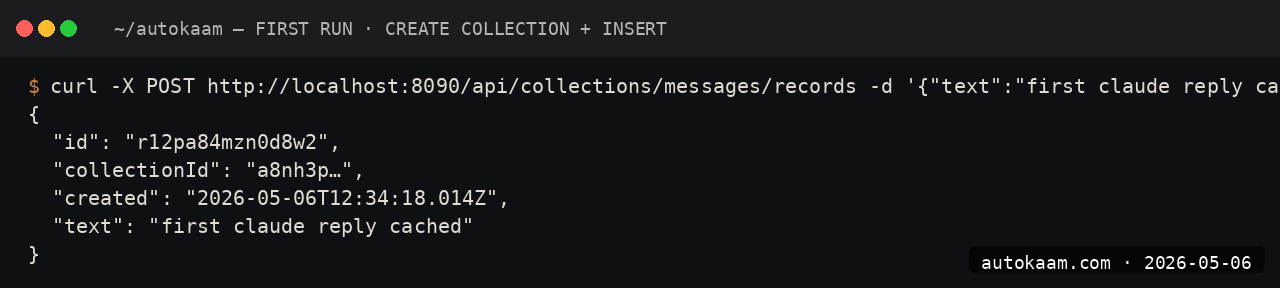
You now have a SaaS-style chat product in one binary, one Go file, and one VM.
What broke for me
Two real specifics. First, on Oracle ARM, my first build of the custom binary crashed at runtime with "segmentation fault" on the very first Claude call. The cause was the Anthropic SDK using a syscall path the ARM kernel handled differently from x86. The fix was upgrading to Go 1.22 (I had been on 1.20) and rebuilding; the issue was a known fix in the toolchain.
Second, my pb_data SQLite file grew to 200MB in two weeks because I was logging full Claude responses in the chat_history collection without truncating. The fix was capping stored response length at 4KB and adding a periodic VACUUM via a PocketBase scheduled task. After that, the DB stayed at ~50MB. Once the file matters, stream it off-box: Litestream replicates the SQLite file to Cloudflare R2 so a dead VM is a restore, not a loss.
What it costs
| Item | Cost |
|---|---|
| PocketBase | Free (MIT) |
| Anthropic SDK Go | Free (MIT) |
| Hosting (Oracle ARM free tier) | Rs 0/mo |
| Anthropic Sonnet 4.6 API | Pay per use |
| Per 1000 short conversations | Rs 25-60 |
For a small Indian SaaS, monthly run cost is whatever Anthropic charges you. Hosting is free on Oracle ARM up to ~10k DAU.
When NOT to use this
Skip PocketBase if your team is full Python or Node. The custom-binary build needs Go ergonomics; if your team does not write Go, the friction is real. Use PocketBase's stock binary plus a separate Python/Node service for the Claude integration.
Skip if you need horizontal scaling. PocketBase is a single-process, single-disk system; for >100k users with significant write volume, the architectural ceiling is real.
If your AI feature needs the backend to recall past notes or documents, you do not need a vector DB bolted on. The same SQLite engine gives you BM25 full-text memory with FTS5, which retrieves over thousands of markdown notes in under a second at zero API cost.
Indian operator angle
PocketBase plus Claude on Oracle ARM is the cheapest serious SaaS stack I run. Total monthly is whatever Anthropic charges; everything else is free. For a Tier-2 city studio shipping a small AI-augmented SaaS, this is the empire pattern.
For payment, wire Razorpay subscriptions in front of the chat endpoint via PocketBase auth. Each user has a subscription_status field; the chat handler checks it before calling Claude. Total added complexity: about 20 lines of Go.
Related
Filed under
More Automation from the desk.
Adobe PDF Services REST: Table Extraction and OCR
I wired Adobe PDF Services REST into my stack as a local tool and pointed it at the scanned invoices and merged-header statements that pdfplumber turned into soup. Here is the exact auth flow, the extract call, and the structuredData.json parsing I run in production, with the real latency and free-tier limits.
AI Agent Eyes and Hands on Linux Apps: AT-SPI2
I was tired of my agent missing buttons because a window shifted a few pixels. So I pointed it at the AT-SPI2 accessibility tree instead, the same data a screen reader consumes, and had it act by element name and role. This walks through driving a GTK dialog and a native Save dialog, then reading the value back to prove the action actually landed.
Reboot-Proof Cloudflare Tunnels: My systemd Setup
I expose every self-hosted app on my home box through a Cloudflare named tunnel, kept alive by a systemd unit that has survived every reboot for weeks. This is the real login-to-systemd flow, the config file, the unit, and why a named tunnel beats a quick tunnel for anything you mean to keep.